SYNQ Keynote · Amazon Advertising

    The Perfect Amazon PPC Campaign Structure

    Mastering Sponsored Products on Amazon — why single keyword campaigns are more important than ever before. A masterclass by Alexander Swade, founder of SYNQ, recorded in English and German.

    Watch in:

    There are only six ways to build a Sponsored Products campaign, and they trade control against complexity in a straight line. This masterclass walks the six options, shows what each level of the hierarchy actually controls, works through how bid adjustments multiply, and then makes the case for the structure that wins in 2026 — one keyword, one product, one campaign — with a real account and the bulk sheets that make it practical. Use the chapter list to jump to what you need.

    Chapter 1

    The six Sponsored Products structure options

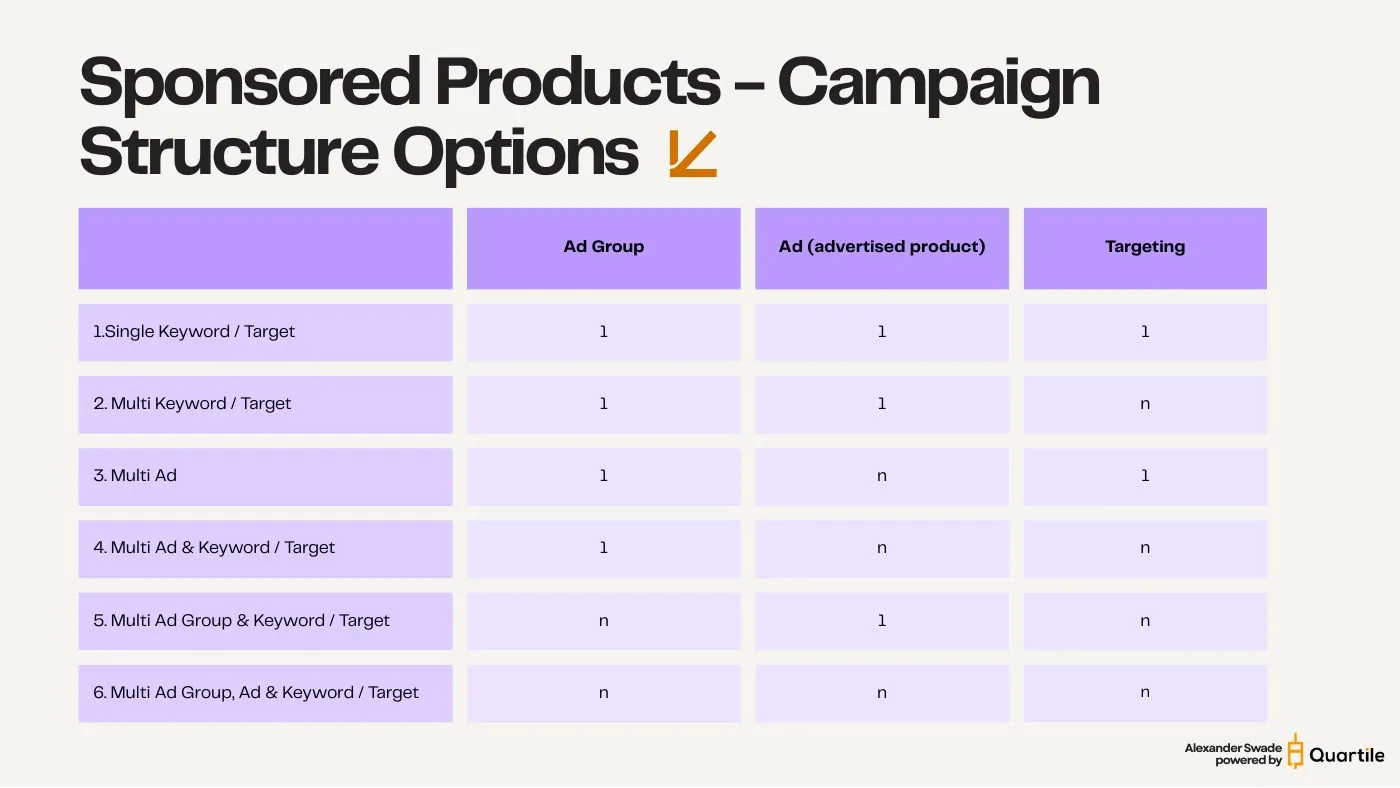
    Every Sponsored Products campaign you will ever build is one of six shapes. They differ only in how many ad groups, ads, and targets sit inside.

    Strip away the naming and the strategy talk and a Sponsored Products campaign is three numbers: how many ad groups it contains, how many ads (advertised products) sit in each, and how many keywords or product targets you point at them. Each number is either 1 or n, which gives exactly six usable combinations.

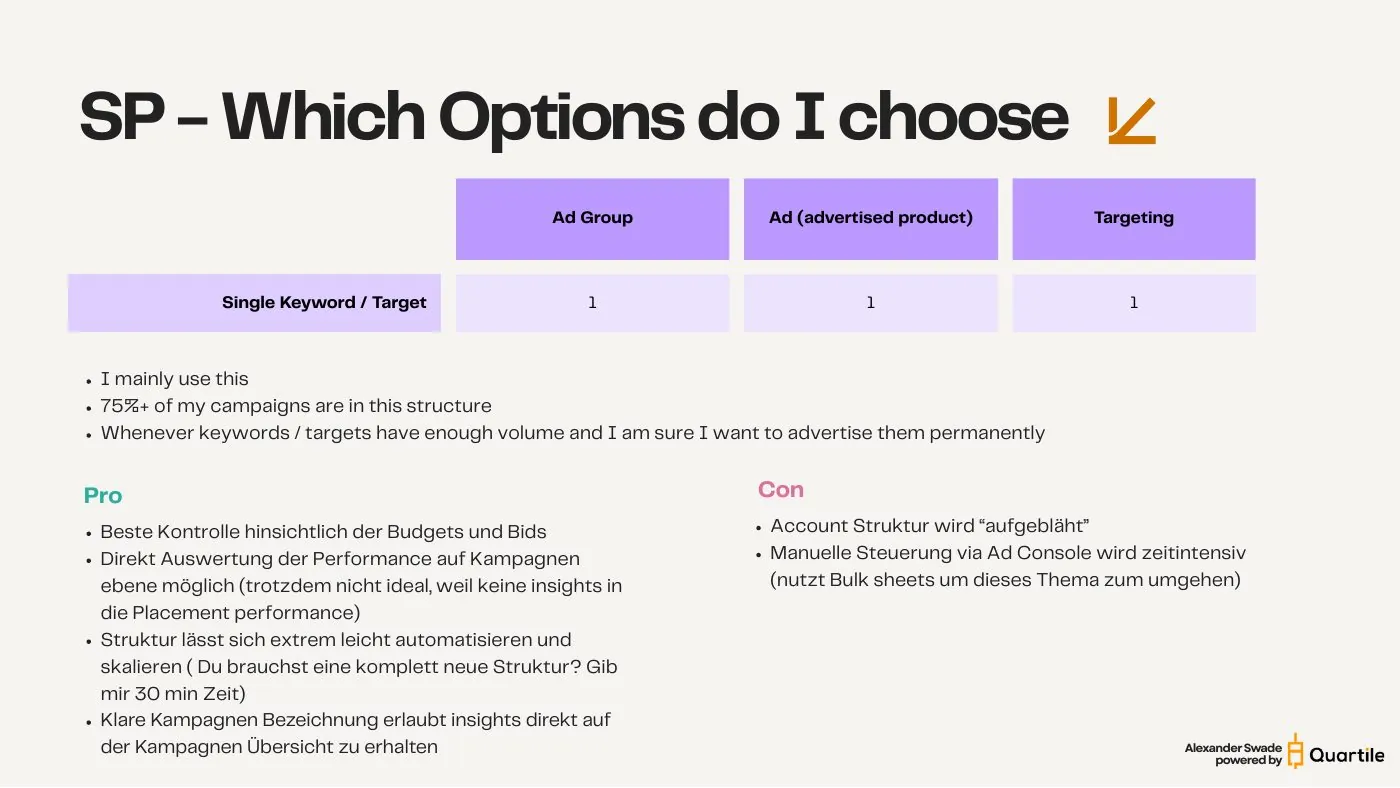
    • 1. Single Keyword / Target — 1 : 1 : 1 one ad group, one product, one target. The tightest possible container.
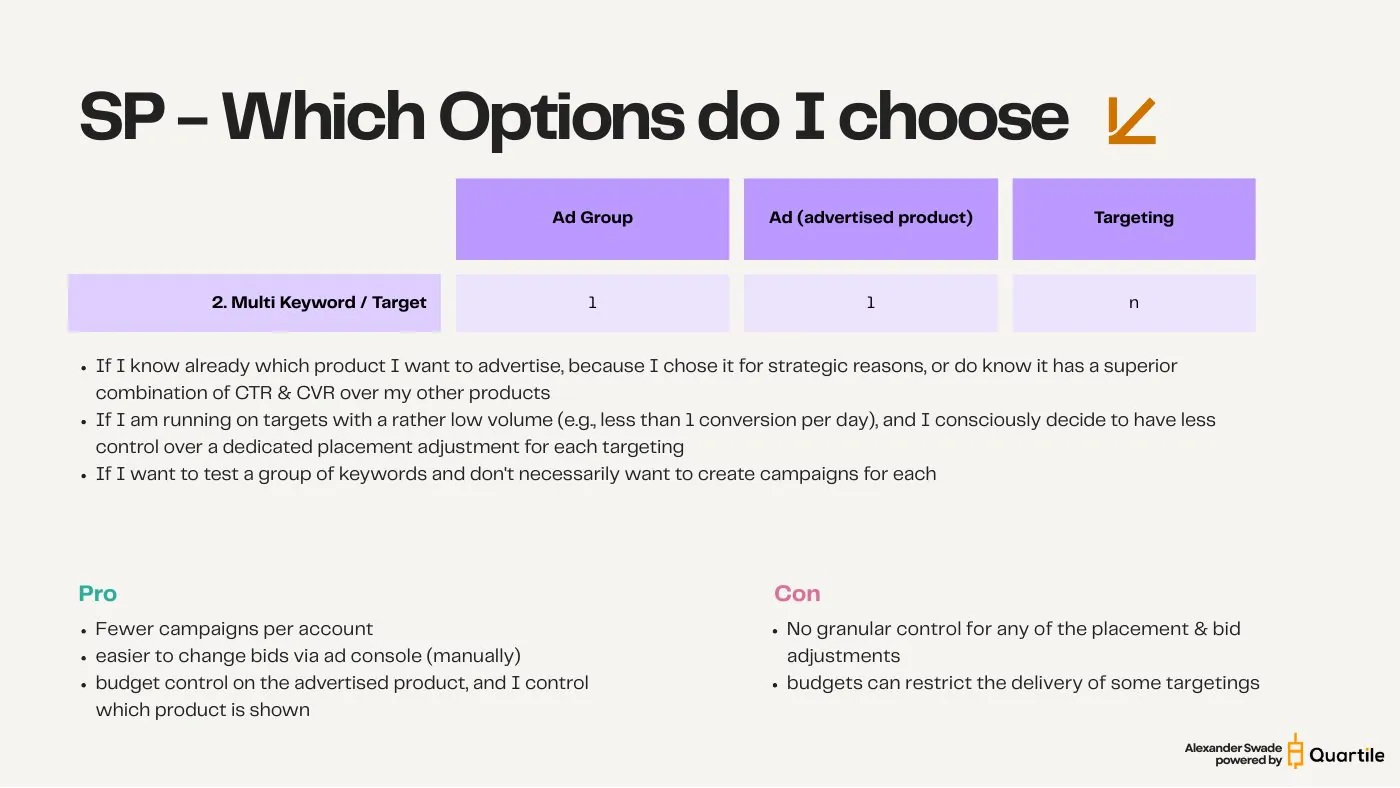
    • 2. Multi Keyword / Target — 1 : 1 : n one product, many targets.
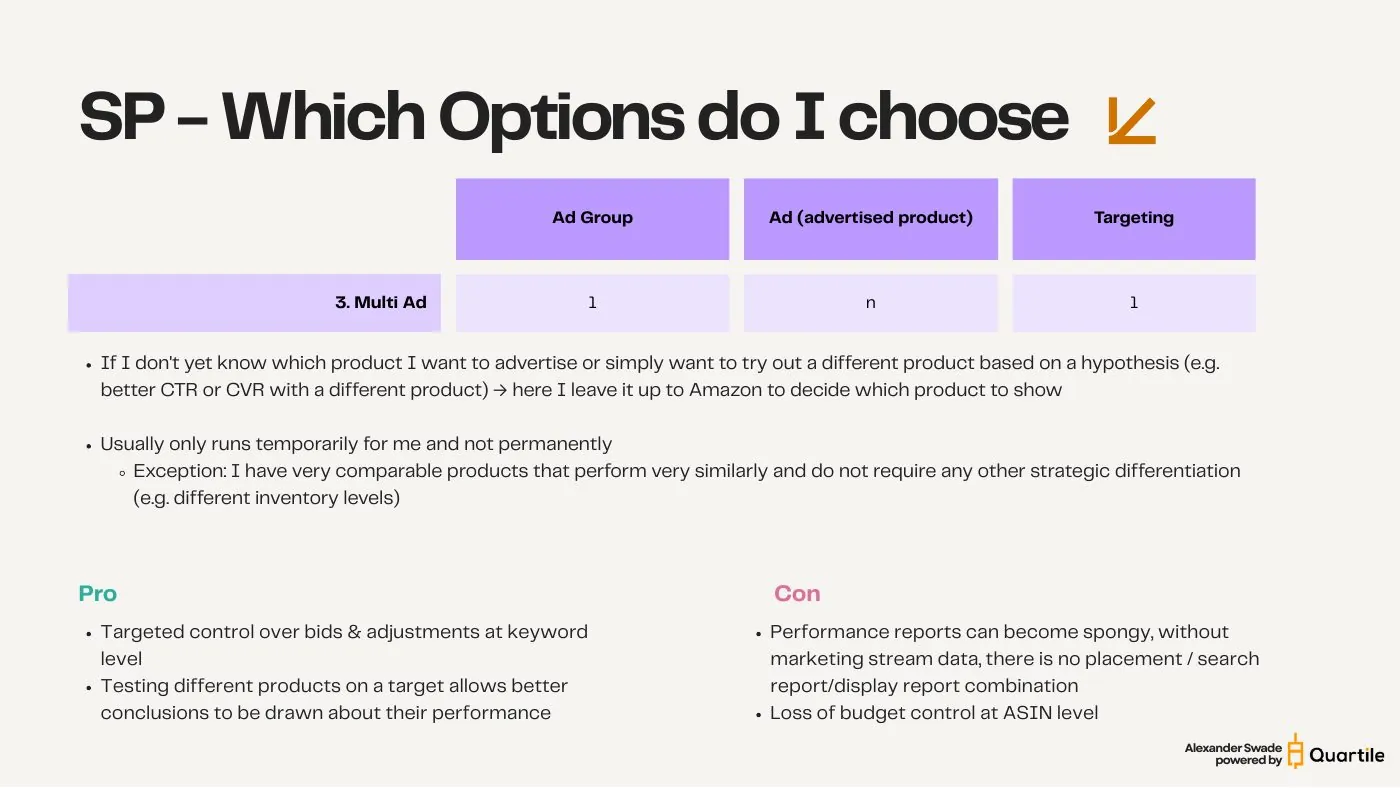
    • 3. Multi Ad — 1 : n : 1 many products competing for one target.
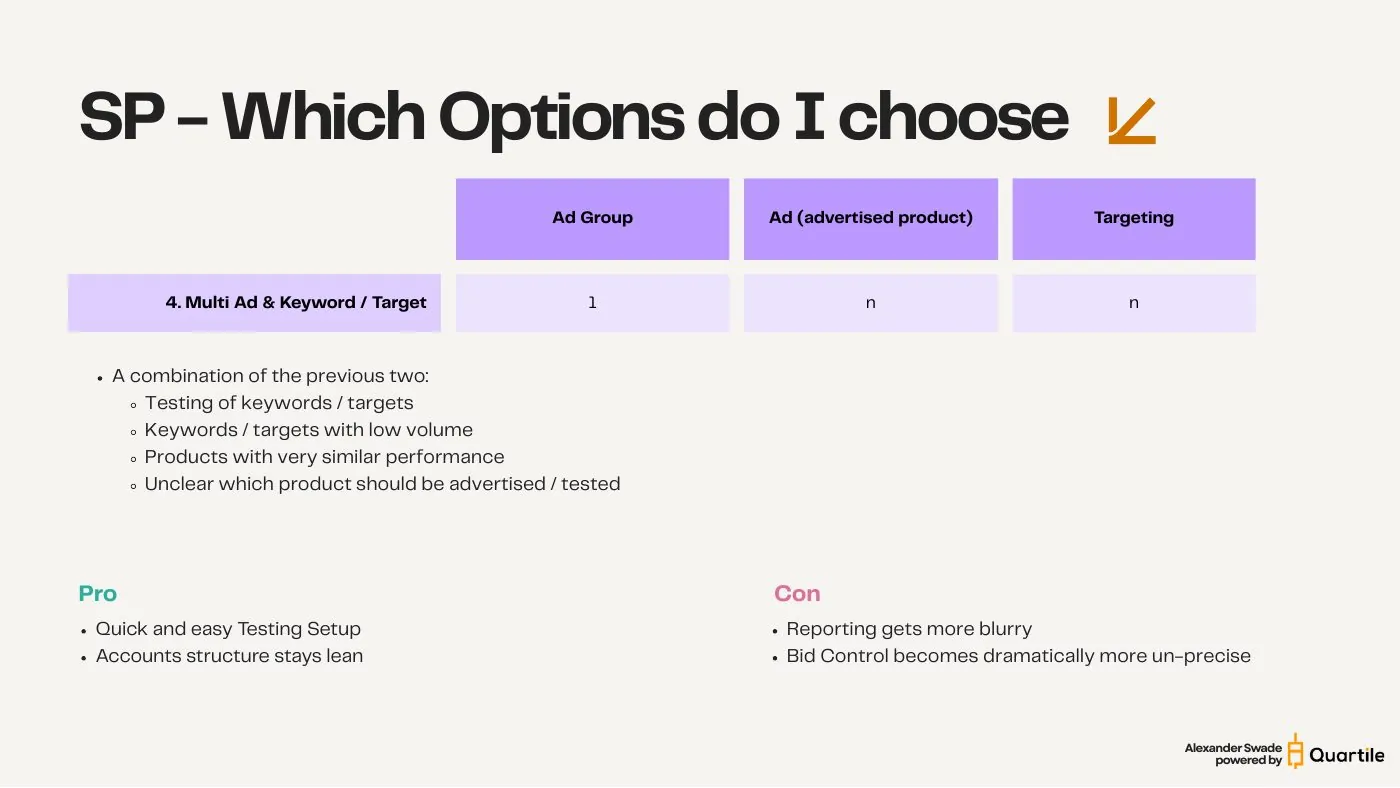
    • 4. Multi Ad & Keyword — 1 : n : n the classic “throw it all in one campaign” setup.
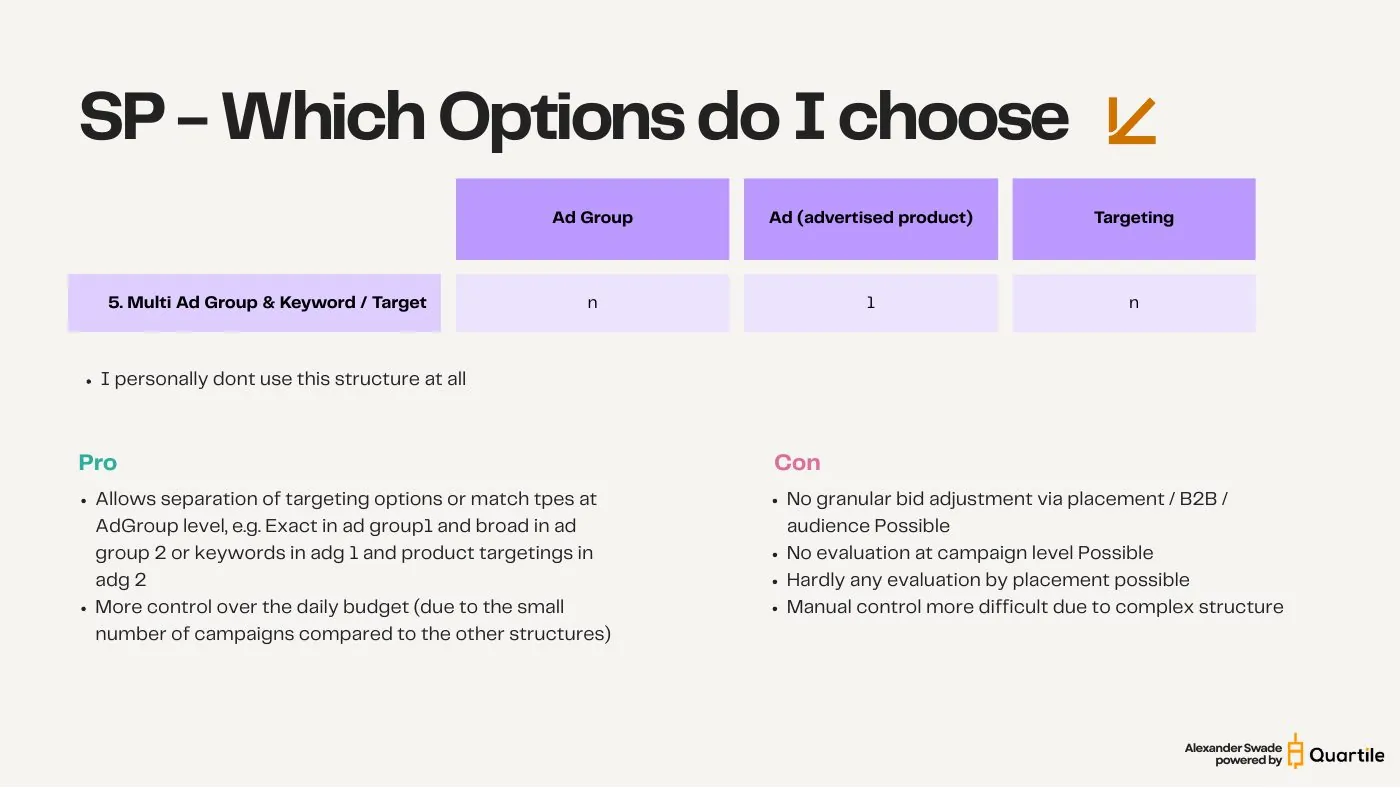
    • 5. Multi Ad Group & Keyword — n : 1 : n match types split across ad groups.
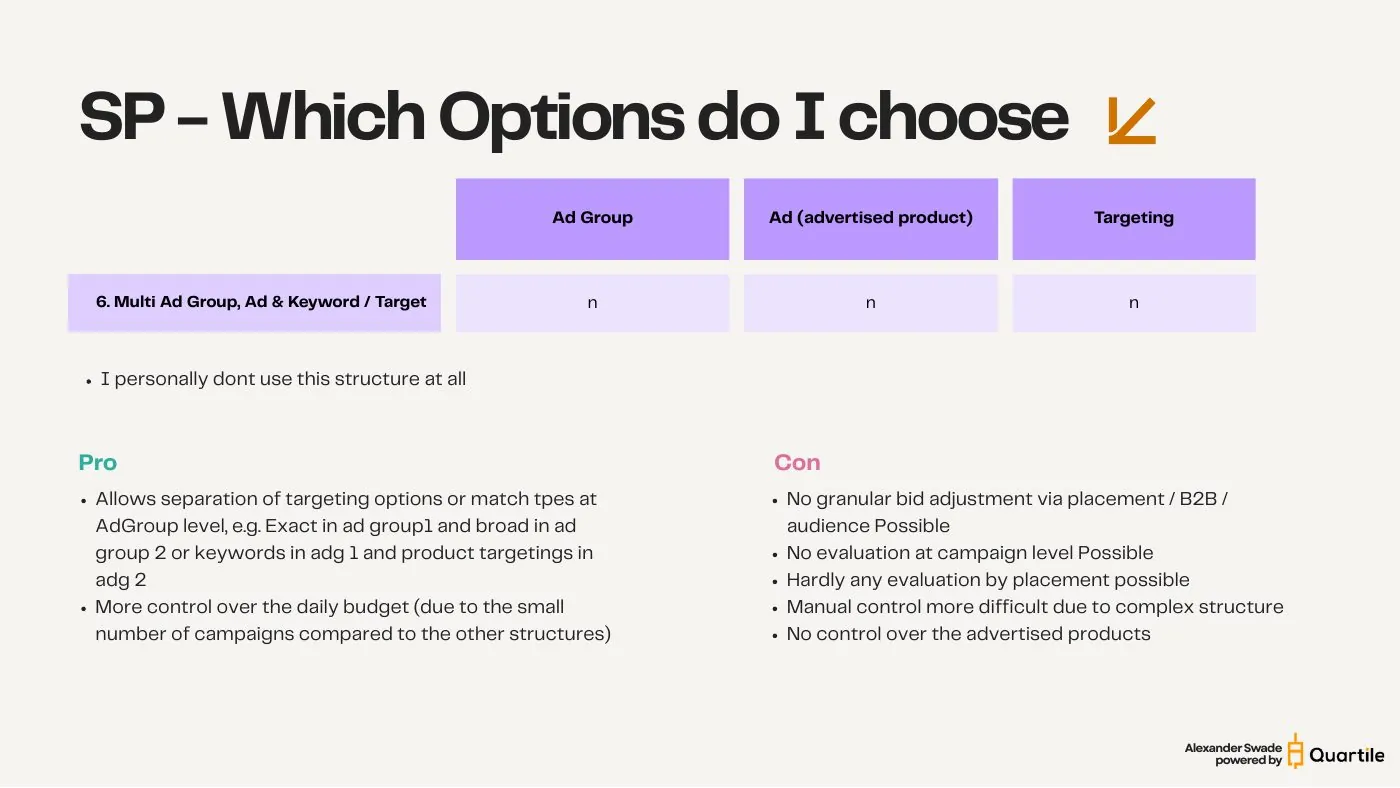
    • 6. Multi Ad Group, Ad & Keyword — n : n : n maximum complexity, minimum control.

    Plot the six against control and complexity and the trade-off is a straight line: the more complexity you add, the less control you keep and the harder the evaluation becomes. There is no option that gives you both.
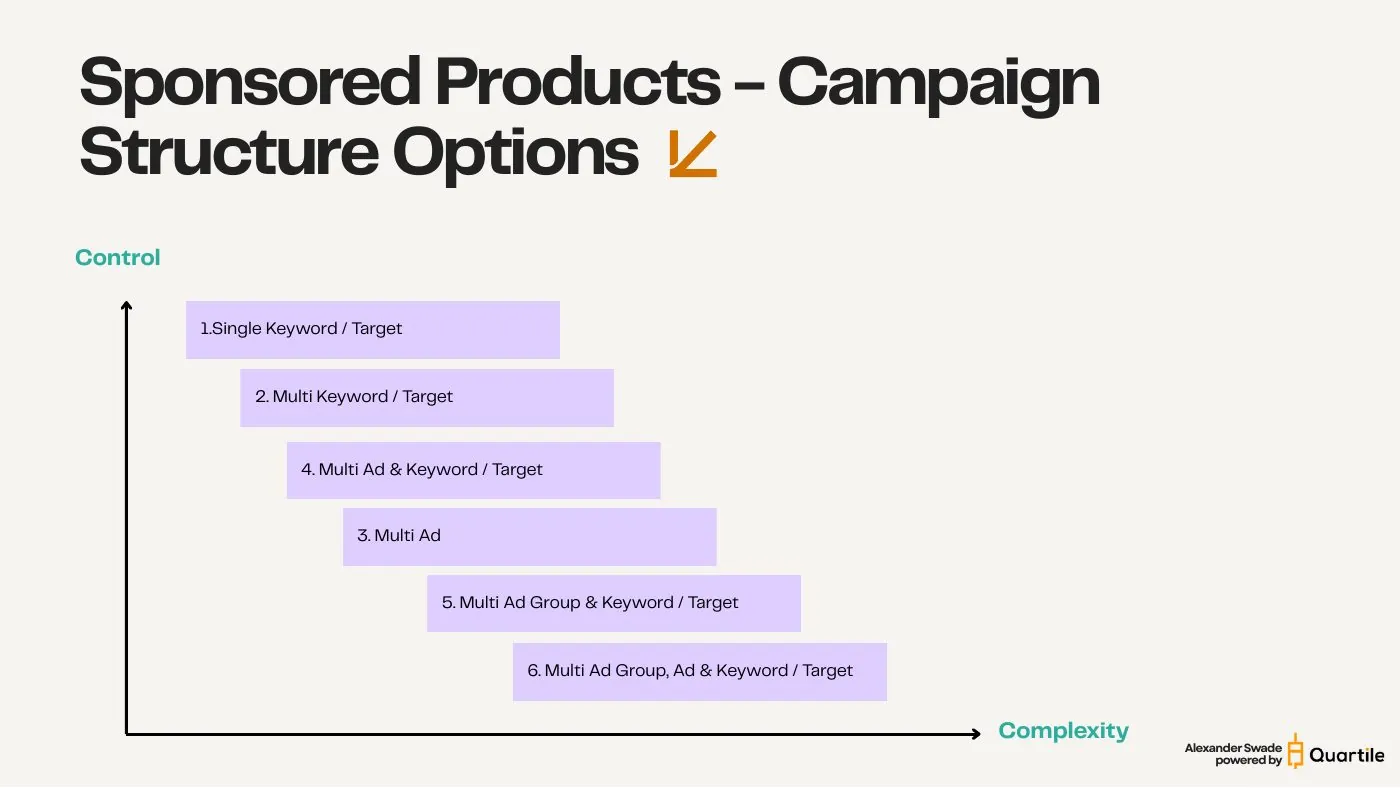
    The six Sponsored Products structure options — slide from the SYNQ Amazon PPC campaign structure keynote
    The six Sponsored Products structure options — slide from the SYNQ Amazon PPC campaign structure keynote
    Chapter 2

    Each entity has exactly one control function

    Before you pick a structure, know what each level of the hierarchy actually lets you control. Most of it lives on the campaign.

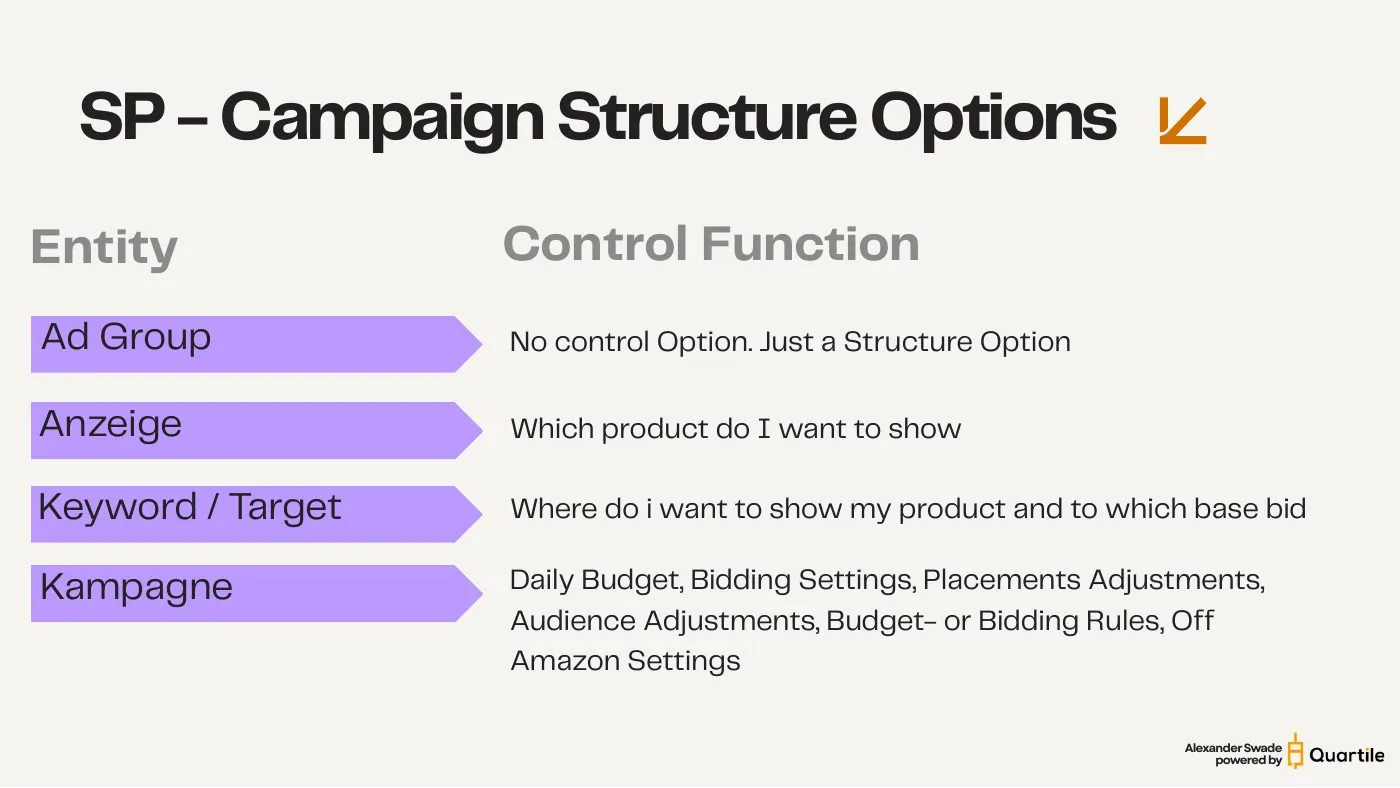
    This is the whole argument in one table. Ad groups do nothing — they are a structural container with no control function of their own. The ad decides which product shows. The keyword or target decides where you appear and at what base bid. Everything else — every setting worth optimizing — sits on the campaign.

    • Ad group: no control function. Purely a structure option.
    • Ad (advertised product): which product do I want to show?
    • Keyword / target: where do I want to be seen, and at which base bid?
    • Campaign: daily budget, bidding strategy, placement adjustments, audience adjustments, B2B adjustments, budget and bidding rules, off-Amazon settings.

    Anything you want to steer independently has to sit in its own campaign — because the campaign is the only level that actually holds levers.

    Each entity has exactly one control function — slide from the SYNQ Amazon PPC campaign structure keynote
    Chapter 3

    How much now lives on the campaign

    The campaign level has quietly become crowded — and every setting you add there applies to everything inside it.

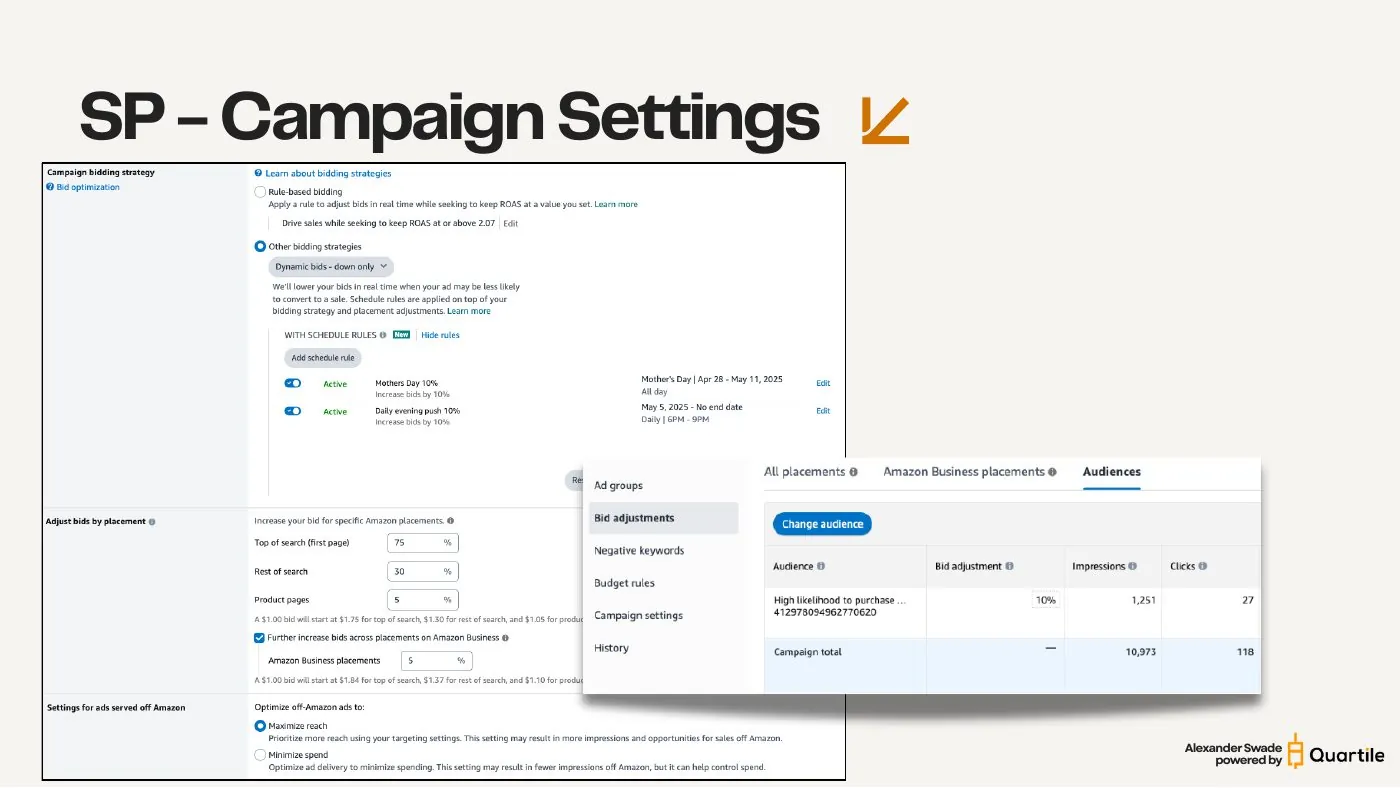
    A single Sponsored Products campaign now carries a bidding strategy (with schedule rules layered on top), separate placement adjustments for Top of Search, Rest of Search and product pages, an Amazon Business adjustment, an audience adjustment, budget rules, and — in the US — an off-Amazon delivery setting that chooses between maximizing reach and minimizing spend.

    A worked example from the console: a $1.00 base bid with Top of Search at 75%, Rest of Search at 30% and product pages at 5% starts at $1.75, $1.30 and $1.05 respectively. Add a further 5% for Amazon Business placements and those become $1.84, $1.37 and $1.10.

    Every one of those settings is campaign-wide. Put twenty keywords in one campaign and all twenty inherit the same placement strategy, the same audience uplift, the same off-Amazon exposure — whether that fits them or not.

    How much now lives on the campaign — slide from the SYNQ Amazon PPC campaign structure keynote
    Chapter 4

    Audience adjustments — pre-built and AMC

    Sponsored Products can now bid differently for specific audiences, including your own AMC-built lookalikes. That is another campaign-level lever.

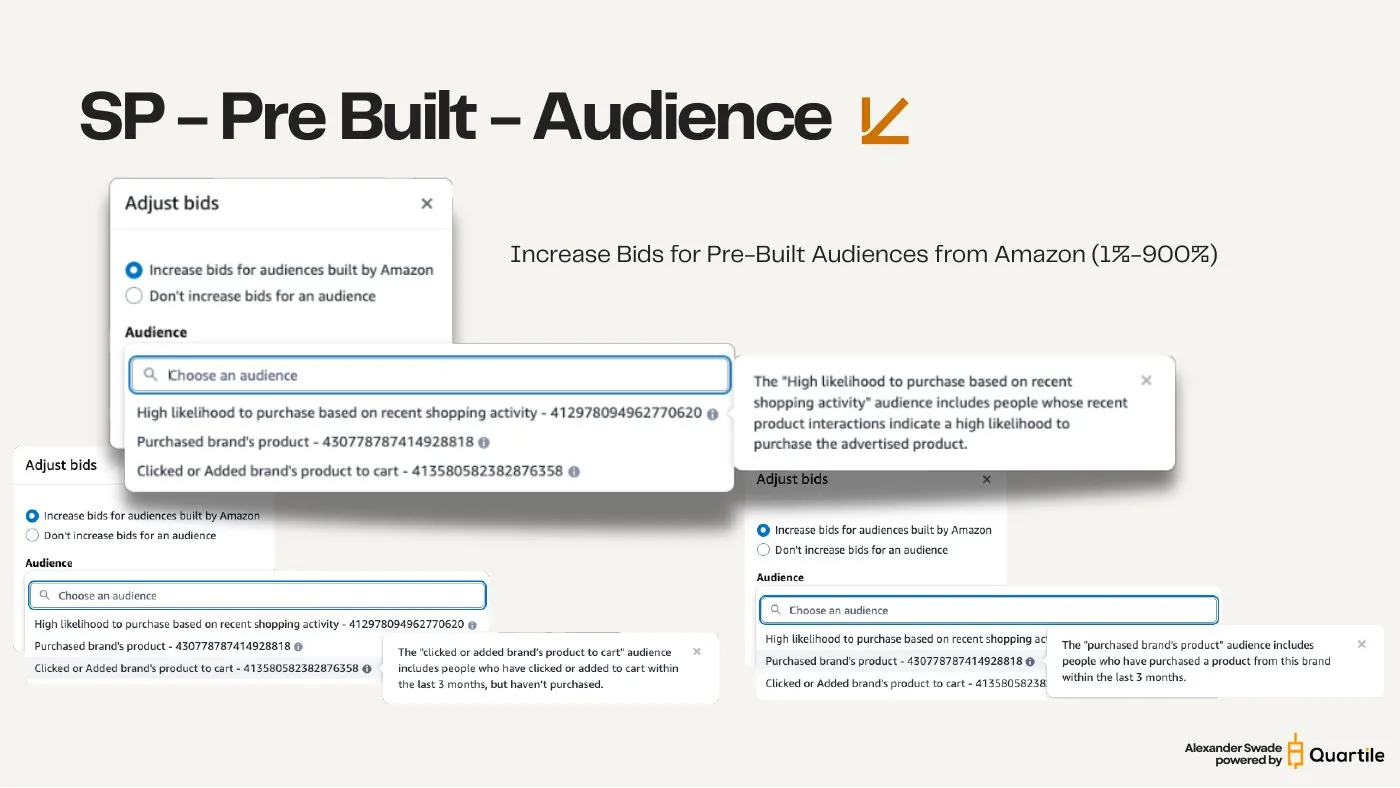
    Amazon ships three pre-built audiences you can raise bids for, anywhere from 1% to 900%: “High likelihood to purchase based on recent shopping activity”, “Purchased brand's product” (bought from this brand in the last 3 months), and “Clicked or added brand's product to cart” (engaged in the last 3 months but didn't buy).

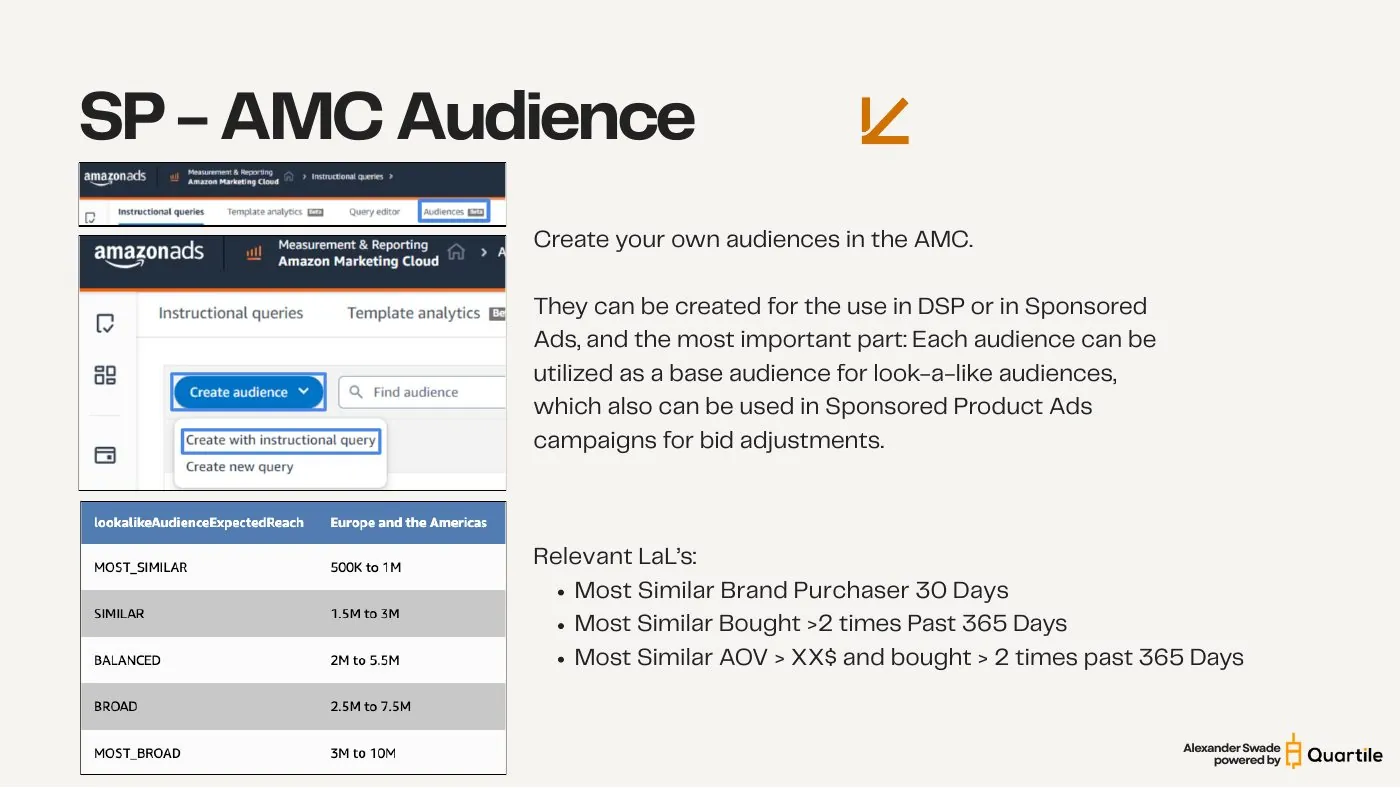
    Beyond that you can build your own audiences in Amazon Marketing Cloud. AMC audiences work for DSP and for Sponsored Ads — and, more importantly, each one can seed a lookalike that you then unlock for bid adjustments inside Sponsored Products campaigns. Lookalike reach scales from MOST_SIMILAR (500K–1M in Europe and the Americas) up to MOST_BROAD (3M–10M).

    • Most Similar Brand Purchaser, 30 days
    • Most Similar, bought more than 2× in the past 365 days
    • Most Similar, AOV above a threshold and bought more than 2× in the past 365 days

    You may choose only one audience adjustment per campaign — AMC or Amazon-built, not both. Another reason a campaign holding many keywords forces a single compromise on all of them.

    Audience adjustments — pre-built and AMC — slide from the SYNQ Amazon PPC campaign structure keynote
    Audience adjustments — pre-built and AMC — slide from the SYNQ Amazon PPC campaign structure keynote
    Chapter 5

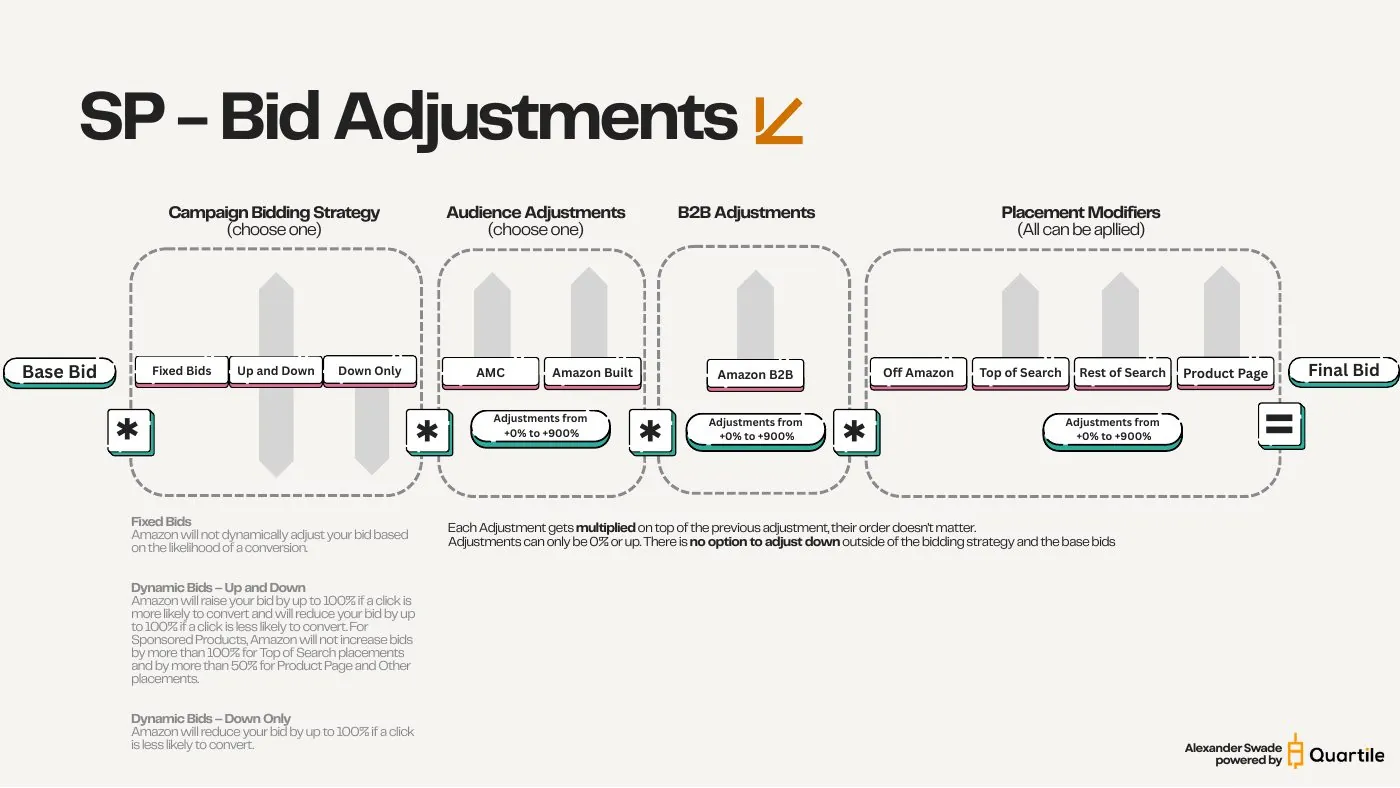
    Bid adjustments multiply — and only ever go up

    This is the mechanic that makes the whole case. Adjustments stack multiplicatively, and outside the bidding strategy there is no way to adjust downward.

    Your final bid is the base bid run through four stages: the campaign bidding strategy (choose one — Fixed, Dynamic Up & Down, or Dynamic Down Only), an audience adjustment (choose one — AMC or Amazon-built, 0% to 900%), a B2B adjustment (0% to 900%), and placement modifiers (off Amazon, Top of Search, Rest of Search, product page — all of which can be applied, each 0% to 900%).

    • Each adjustment is multiplied on top of the previous one, and the order doesn't matter — the result is the same.
    • Adjustments can only be 0% or upward. There is no option to adjust down outside of the bidding strategy and the base bid itself.
    • Dynamic — Down Only: Amazon reduces your bid by up to 100% when a click is less likely to convert.
    • Dynamic — Up & Down: Amazon raises your bid up to 100% when a click is more likely to convert and lowers it up to 100% when it isn't. On Sponsored Products, increases are capped at +100% for Top of Search and +50% for product page and other placements.
    • Fixed Bids: Amazon does not adjust your bid based on conversion likelihood at all.

    Because the only downward lever is the base bid — and the base bid lives on the keyword — one keyword per campaign is the only way to use the upward levers surgically instead of across the board.

    Bid adjustments multiply — and only ever go up — slide from the SYNQ Amazon PPC campaign structure keynote
    Chapter 6

    Why single keyword / target campaigns win

    1 : 1 : 1 is not dogma — it is the only structure where every campaign-level lever lands on exactly one keyword. 75%+ of my campaigns are built this way.

    The single keyword / target structure — one ad group, one advertised product, one target — is what I mainly use. It goes on whenever a keyword or target has enough volume and I'm confident I want to advertise it permanently. The case for it has got stronger every year, simply because Amazon keeps adding settings that only exist at campaign level.

    • Best possible control over budgets and bids.
    • Performance readable directly at campaign level — still not perfect, because you get no placement-level insight there.
    • Extremely easy to automate and scale. Need a completely new structure? Give me 30 minutes.
    • Clear campaign naming means you get your insights straight from the campaign overview.

    The costs are real and worth naming. The account structure gets bloated, and manual management through the ad console becomes time-consuming — which is exactly why bulk sheets stop being optional.

    Why single keyword / target campaigns win — slide from the SYNQ Amazon PPC campaign structure keynote
    Chapter 7

    When the other five options earn their place

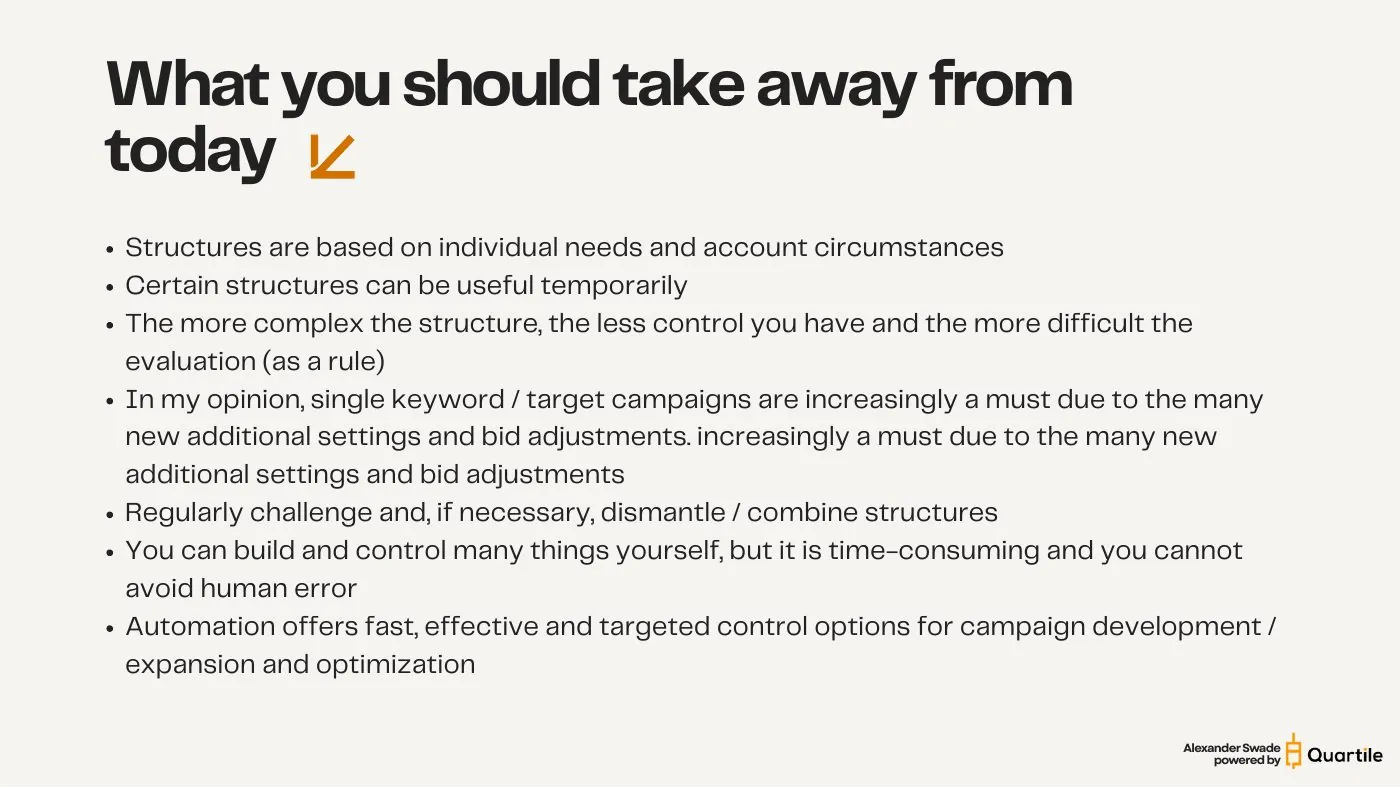
    Structures are chosen for individual needs and account circumstances — and some are useful only temporarily.

    • 2. Multi Keyword / Target (1:1:n): when you already know which product to advertise (chosen strategically, or it has the superior CTR × CVR combination), when targets have low volume — under roughly one conversion a day — and you consciously give up per-target placement control, or when you want to test a group of keywords without a campaign for each. Fewer campaigns, easier manual bidding, budget control on the advertised product; but no granular placement/B2B/audience adjustment, and one budget can throttle the delivery of some targets.
    • 3. Multi Ad (1:n:1): when you don't yet know which product to advertise, or want to test a hypothesis (better CTR or CVR with a different product) and let Amazon pick. Usually temporary — the exception is genuinely comparable products with similar performance and no strategic reason to separate them, such as differing inventory levels. Cost: without Marketing Stream data there's no placement / search term / ad report combination, and you lose budget control at ASIN level.
    • 4. Multi Ad & Keyword (1:n:n): a combination of the two above — keyword testing, low-volume targets, near-identical products, or when it's unclear which product should be advertised. Quick, easy testing setup that keeps the account lean, at the cost of blurrier reporting and dramatically less precise bid control.
    • 5 and 6 — the multi ad group structures (n:1:n and n:n:n): I personally don't use these at all. They do let you separate match types or targeting types at ad-group level and give more daily-budget control through fewer campaigns, but you get no granular placement, B2B or audience adjustment, no meaningful evaluation at campaign level, hardly any placement evaluation, and manual control becomes genuinely difficult.

    Certain structures can be the right answer temporarily. Challenge them regularly — and be willing to dismantle or consolidate them again.

    When the other five options earn their place — slide from the SYNQ Amazon PPC campaign structure keynote
    When the other five options earn their place — slide from the SYNQ Amazon PPC campaign structure keynote
    When the other five options earn their place — slide from the SYNQ Amazon PPC campaign structure keynote
    When the other five options earn their place — slide from the SYNQ Amazon PPC campaign structure keynote
    When the other five options earn their place — slide from the SYNQ Amazon PPC campaign structure keynote
    Chapter 8

    What it looks like in a real account

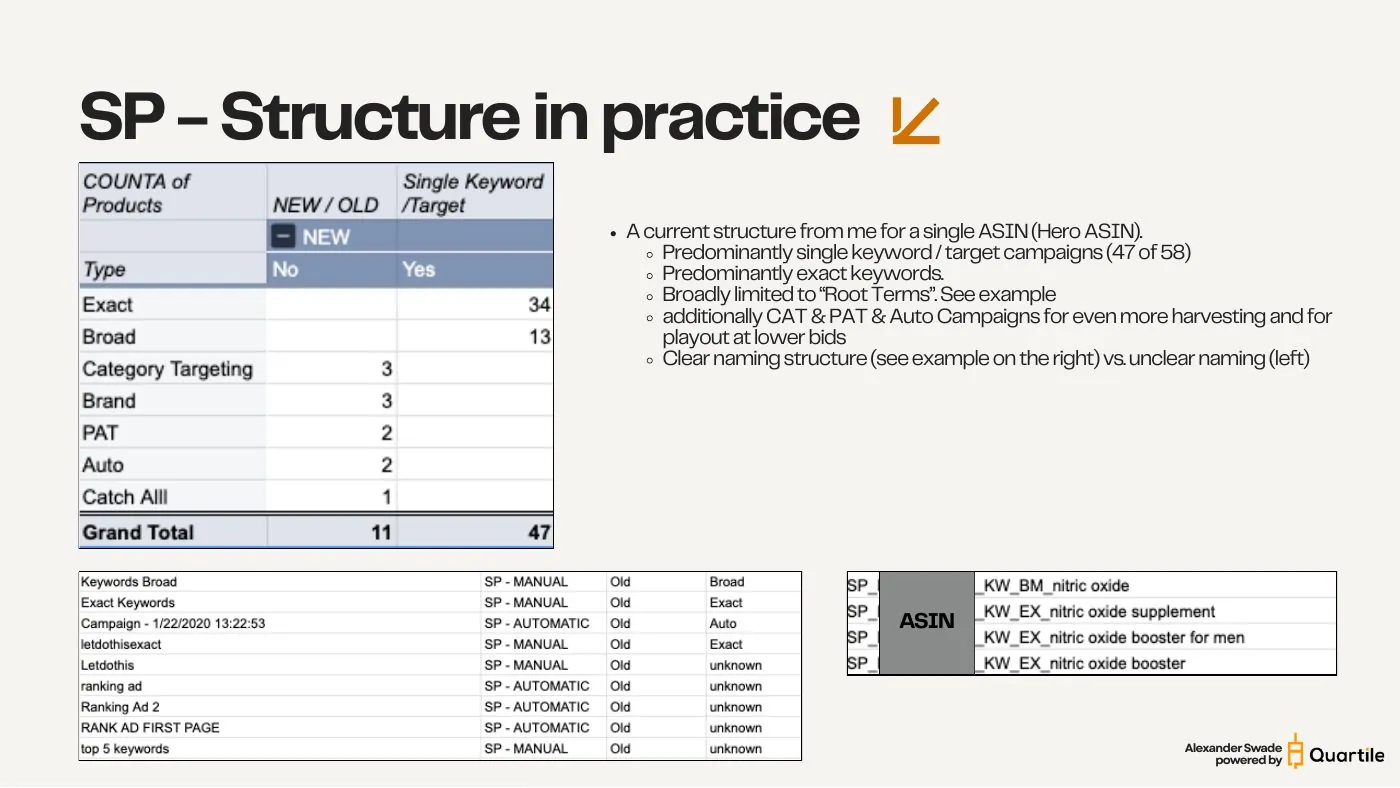
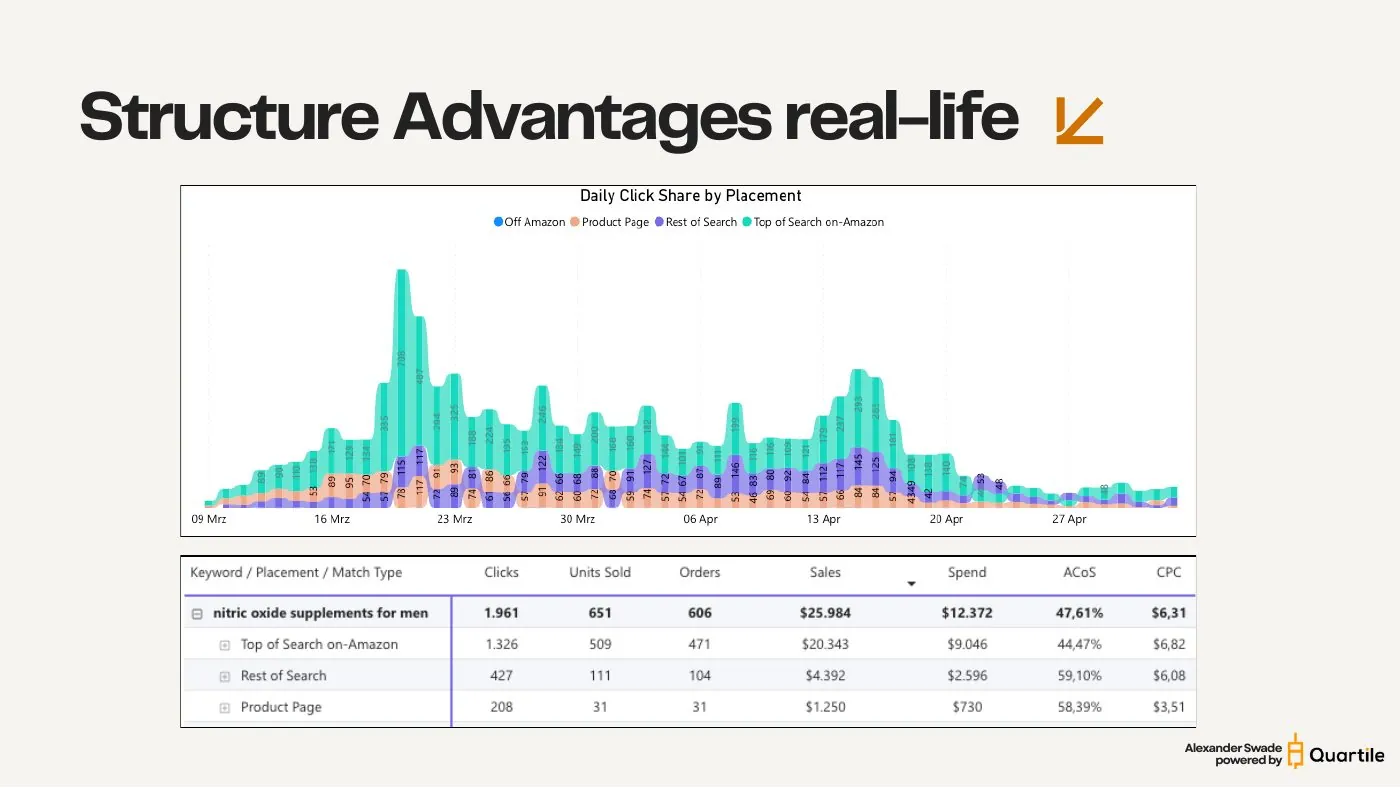
    A live structure for a single Hero ASIN: 58 campaigns, 47 of them single keyword / target.

    • 47 of 58 campaigns are single keyword / target — 34 exact and 13 broad.
    • Predominantly exact keywords. Broad is deliberately limited to root terms.
    • Plus the harvesting layer: 3 category targeting, 3 brand, 2 PAT, 2 auto and 1 catch-all campaign — for more harvesting and for delivery at lower bids.
    • Clear naming throughout: SP_<ASIN>_KW_EX_nitric oxide supplement, SP_<ASIN>_KW_BM_nitric oxide — versus the legacy campaigns called “letdothis”, “ranking ad 2” and “top 5 keywords”.

    And here is the payoff, on one real keyword. “nitric oxide supplements for men” took 1,961 clicks and 606 orders for $25,984 in sales on $12,372 of spend — a 47.61% ACOS at a $6.31 CPC. Split by placement, the picture separates sharply: Top of Search delivered 1,326 clicks at 44.47% ACOS, Rest of Search 427 clicks at 59.10%, and product pages 208 clicks at 58.39% — the cheapest CPC of the three at $3.51, and still the worst efficiency.

    That read is only possible because the keyword owns its campaign. Bundle it with nineteen others and the placement split becomes an average that tells you nothing you can act on.

    What it looks like in a real account — slide from the SYNQ Amazon PPC campaign structure keynote
    What it looks like in a real account — slide from the SYNQ Amazon PPC campaign structure keynote
    Chapter 9

    Building it at scale with bulk sheets

    A 1:1:1 account is only workable if you stop building campaigns by hand. Bulk sheets are what make the structure affordable.

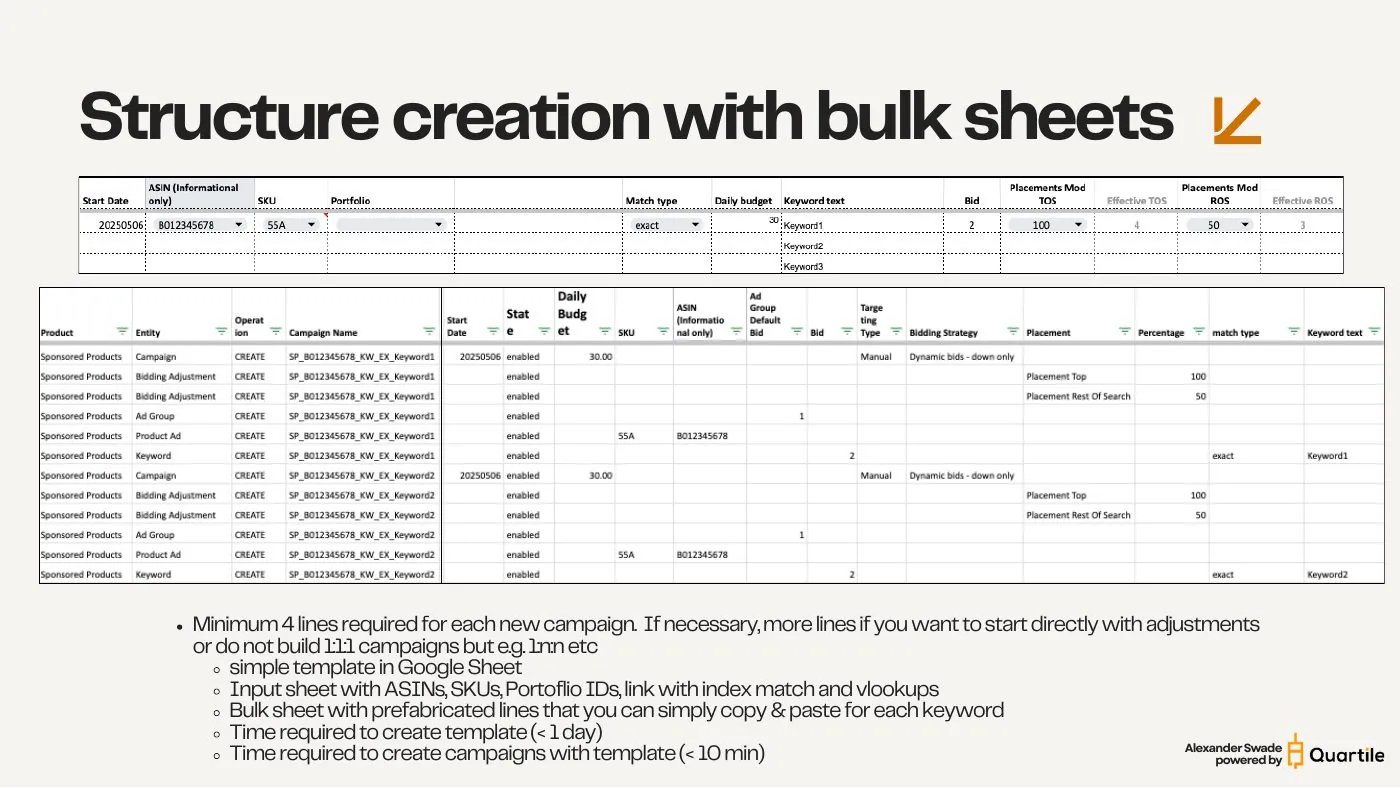
    Every new campaign needs a minimum of four lines in the bulk sheet — campaign, ad group, product ad, keyword — plus extra lines if you want to launch with bid adjustments already in place, or if you're building something other than 1:1:1.

    • A simple Google Sheet template does the job: an input sheet with ASINs, SKUs and portfolio IDs, wired up with index/match and vlookups.
    • A bulk sheet of prefabricated rows that you copy and paste per keyword.
    • Time to build the template: under a day.
    • Time to create campaigns with it afterwards: under 10 minutes.

    You can build and steer a lot of this yourself, but it is time-consuming and you cannot rule out human error. Automation gives you fast, effective, targeted control over campaign creation, expansion and optimization.

    Building it at scale with bulk sheets — slide from the SYNQ Amazon PPC campaign structure keynote
    Building it at scale with bulk sheets — slide from the SYNQ Amazon PPC campaign structure keynote

    Get the full masterclass — watch or download

    The complete hour-long walkthrough with the original slides, the real account structure and the placement data. Watch on YouTube or grab the deck as a PDF — free, no email required, English or German.

    Frequently Asked Questions About Amazon PPC Campaign Structure

    The structure, control and bid-adjustment questions behind every Sponsored Products account that scales cleanly

    Get in touch

    This masterclass was created by Alexander Swade and the team at SYNQ. Want a second pair of eyes on how your account is structured?